I have a folder of references that I created for a grant application. I want to add all of them into word in alphabetical order. I don’t want to cite anything. I just want all the references from that folder made into a word document that lists them in alphabetical order. It’s a simple request. I don’t want to have to cite the references individually. At least not yet. I’ll do that later. For now I just need a “References” document.
Welcome to our forum, @area51. In the Paperpile web app, you can copy citations to the clipboard to generate a formatted reference list from any folder or label, without inserting citations one-by-one in your Word document.
- Open the Paperpile web app and click the folder in the sidebar to view its contents.
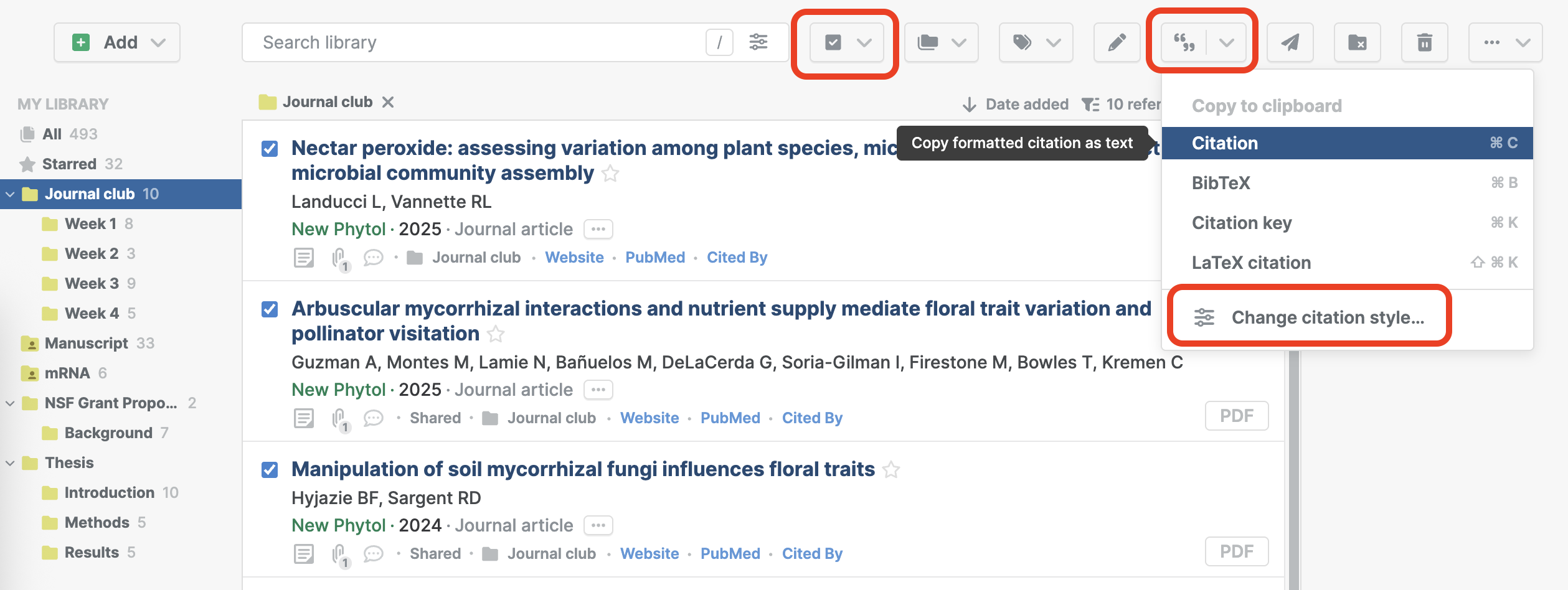
- Click the checkbox in the toolbar to select all references in the list, or press
Cmd+A(macOS) orCtrl+A(Windows/Linux). - Click the cite button in the toolbar to open the cite menu.
- Choose a citation style that automatically orders the reference list alphabetically by author (for example, APA). Click Change citation style to choose from over 8,000 citation styles.
- Click the cite button in the toolbar to copy the reference list to the clipboard and paste it into your Word document.
That will give you a properly formatted, alphabetized reference list you can use for your grant application now, without having to cite anything in the text.
Amazing that worked perfectly thanks!
1 Like