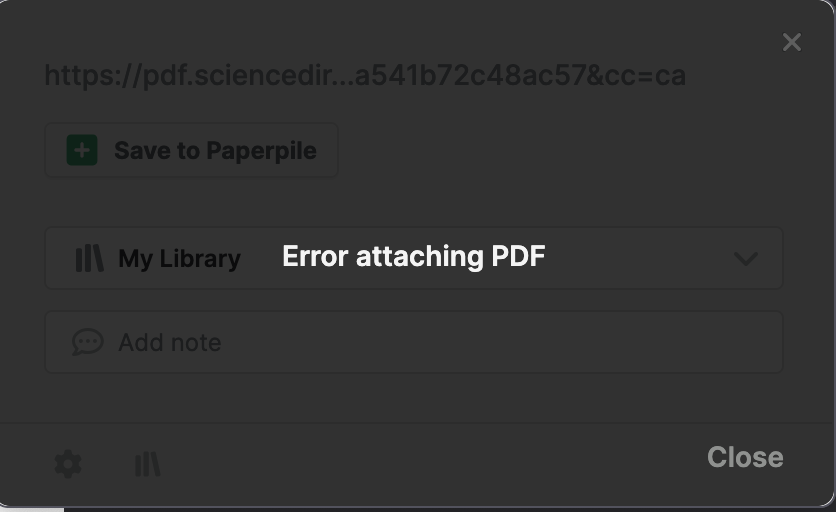
If I use the extension (both Chrome or Firefox) to add a paper to my library, often times the PDF does not automatically get attached. That’s fine, as I can usually go directly to the PDF (for instance, from bioRxiv) and click “Attach PDF to…” in the extension to ensure the PDF does get attached.
However, lately I have noticed that I am completely unable to use this function. Instead, when I click “Attach PDF to…” I get “Error attaching PDF”. Now, I have to manually download the file and the re-upload it to Paperpile. To make matters even worse, for some papers I have noticed that the re-uploading feature often stalls or hangs indefinitely and the PDF doesn’t get attached. Neither of these issues were present before.
Thank you for reporting, @dan. Does this happen on all webpages or only some websites like bioRxiv? Can you share some example URLs where the error occurs?
On my end it appears that the publisher may be blocking the download from bioRxiv and you need to solve the CAPTCHA to complete the authentication - is this the message you see when you click the P button on a bioRxiv webpage? Please share a screenshot if you see something different.
This happens with all websites where I try to attach a PDF to a selected item in Paperpile.
In cases where CAPTCHAs are involved, I get blocked by the CAPTCHA when trying to import into Paperpile. So, then I have to go try and attach the PDF directly using the extension. When I click “Attach PDF to…” I get the following error:
To be frank, this has rendered Paperpile near useless if automatic PDF attaching is unpredictable and broken in most cases – especially now with CAPTCHAs everywhere. This wasn’t the case before (regardless of CAPTCHAs), and now having to manually downloading PDFs just to re-upload it to Paperpile every time defeats the purpose.
Thank you for sharing the screenshot and for providing these details, @dan. I’m sorry for the trouble.
To help our team reproduce the issue you are having, can you share some example URLs where you try to attach a PDF to a selected reference in Paperpile and you see the error in your screenshot.
Welcome to our forum and thanks for adding to this thread,@U_F. Could you share a bit more detail about what you’re seeing?
When you say you can’t add a PDF as an ebook or attach it after creating an entry via search, could you let us know:
Which device and browser you’re using
What happens when you try to add the PDF (e.g., error message, button disabled, nothing happens)
Whether this happens with all PDFs or only certain ones.
If possible, a screenshot or short screen recording would also help us understand what’s going on. You can share it here, over our in-app messenger, or by emailing support@paperpile.com.