Dear all,
I tried to export my citations as RIS, but only a fraction of them are included in the RIS. Could it be that citations I added by searching using the sidebar in the google doc aren’t making it? I would really need this fixed. Please help! Thank you!
Thank you for reporting, @Magdalena_Schindler. Exporting references from a Google Docs to RIS file format via the Paperpile menu (Paperpile extension) or via the Google Docs sidebar add-on should both work.
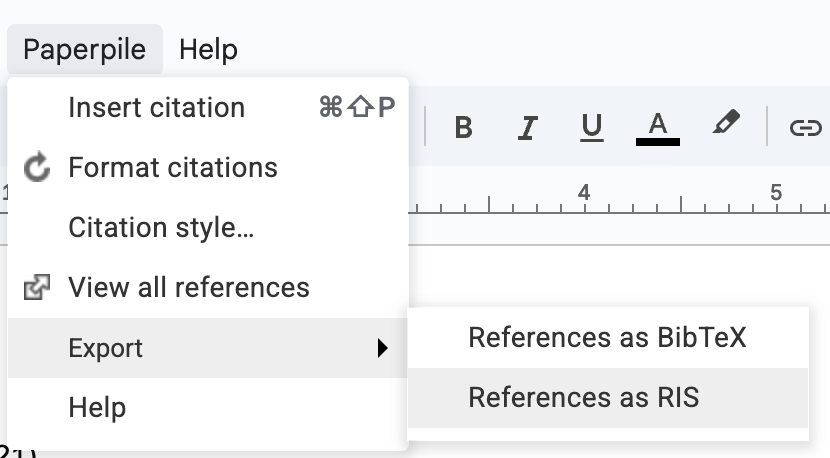
From the Paperpile menu:
In Google Docs, click Paperpile > Export > References as RIS
From the Google Docs sidebar add on:
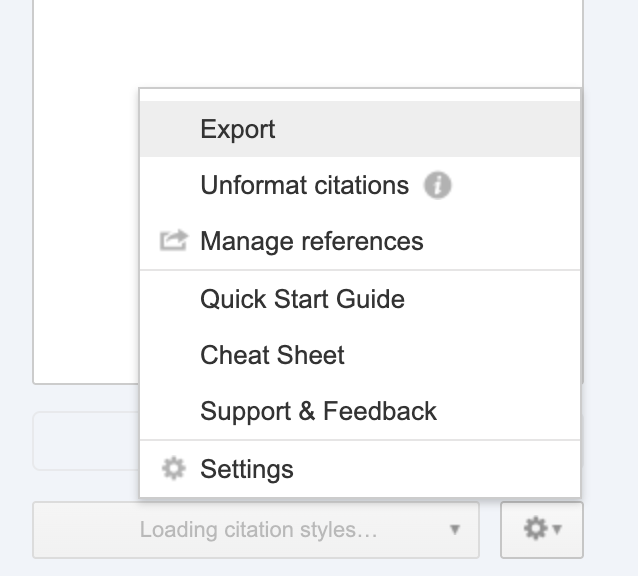
- Open the sidebar add-on from the Google Docs toolbar: Click Extensions > Paperpile > Manage citations
- Click the gear button > Export
- In the “Export references” section, select RIS and click Export references.
If the issue continues to persist, please share the Google Doc with us by emailing support@paperpile.com so that our team can investigate.
Thank you for your help! I had to mark the whole document to have all references “active”. then it exported a complete .ris
1 Like