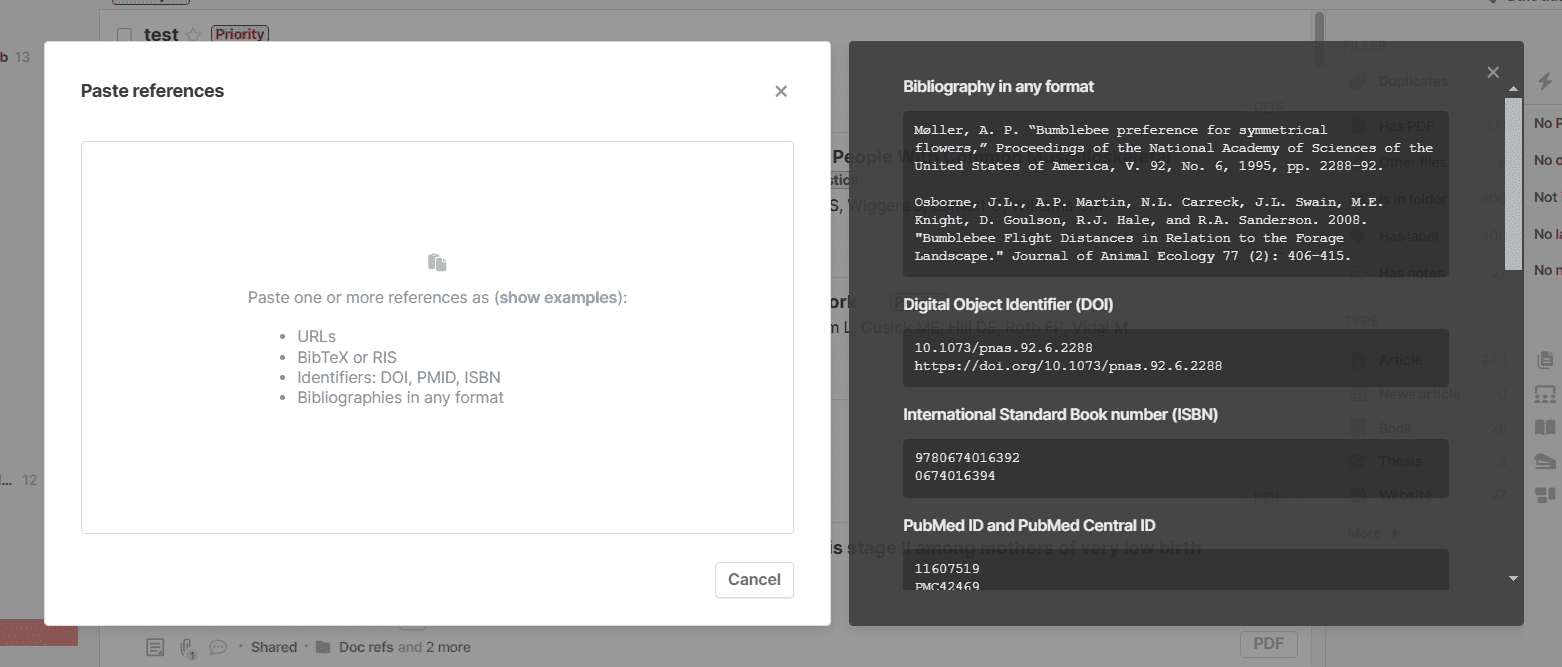
I’m writing a book that needs proper citations. I have a lot of copy with in-text hyperlinks that will take a long time to add as a paperpile citation. I vibe-coded a gdoc script that successfully extracts the links into a footnote, but am not sure how to automate the next step with paperpile. here’s an example google doc: paperpile link testing - Google Docs
The first footnote is how the script outputs it.
Here’s the script:
function onOpen() {
DocumentApp.getUi()
.createMenu(‘Footnote Links’)
.addItem(‘From selection’, ‘footnoteLinksFromSelection’)
.addItem(‘Test - Show URLs’, ‘testShowUrls’)
.addToUi();
}
// Debug function to test URL extraction
function testShowUrls() {
const doc = DocumentApp.getActiveDocument();
const ui = DocumentApp.getUi();
const sel = doc.getSelection();
if (!sel) {
return ui.alert(‘Select text first’);
}
const urls = ;
sel.getRangeElements().forEach(re => {
const element = re.getElement();
if (element.getType() !== DocumentApp.ElementType.TEXT) return;
const text = element.asText();
const startOffset = re.isPartial() ? re.getStartOffset() : 0;
const endOffset = re.isPartial() ? re.getEndOffsetInclusive() : text.getText().length - 1;

for (let i = startOffset; i <= endOffset; i++) {
  const url = text.getLinkUrl(i);
  if (url && !urls.includes(url)) {
    urls.push(url);
  }
}
});
ui.alert(‘Found URLs:\n’ + (urls.length > 0 ? urls.join(‘\n’) : ‘No URLs found’));
}
function footnoteLinksFromSelection() {
const doc = DocumentApp.getActiveDocument();
const ui = DocumentApp.getUi();
const sel = doc.getSelection();
if (!sel) {
return ui.alert(‘Select a single sentence (including its ending punctuation) and try again.’);
}
// Collect all unique URLs from the selection in order
const urls = ;
const seenUrls = new Set();
sel.getRangeElements().forEach(re => {
const element = re.getElement();
if (element.getType() !== DocumentApp.ElementType.TEXT) return;
const text = element.asText();
const startOffset = re.isPartial() ? re.getStartOffset() : 0;
const endOffset = re.isPartial() ? re.getEndOffsetInclusive() : text.getText().length - 1;

// More thorough URL extraction
let currentUrl = null;

for (let i = startOffset; i <= endOffset; i++) {
  const url = text.getLinkUrl(i);

  if (url !== currentUrl) {
    if (url && !seenUrls.has(url)) {
      urls.push(url);
      seenUrls.add(url);
    }
    currentUrl = url;
  }
}
});
if (urls.length === 0) {
return ui.alert(‘No hyperlinks found in the selected sentence.’);
}
// Show what we found for confirmation
const proceed = ui.alert(
‘Found Links’,
Found ${urls.length} link(s):\n\n${urls.map((u, i) => ${i+1}. ${u.substring(0, 50)}${u.length > 50 ? ‘…’ : ‘’}).join('\n')}\n\nCreate footnote?,
ui.ButtonSet.YES_NO
);
if (proceed !== ui.Button.YES) {
return;
}
const documentId = doc.getId();
// Find the position after the selection
const lastRange = sel.getRangeElements()[sel.getRangeElements().length - 1];
const lastElement = lastRange.getElement();
if (lastElement.getType() !== DocumentApp.ElementType.TEXT) {
return ui.alert(‘Selection must end with text.’);
}
// Use a simpler marker without special characters
const marker = FNMARKER${Date.now()};
const lastText = lastElement.asText();
const insertOffset = lastRange.isPartial() ?
lastRange.getEndOffsetInclusive() + 1 :
lastText.getText().length;
console.log(Inserting marker at offset ${insertOffset});
lastText.insertText(insertOffset, marker);
// Force save
doc.saveAndClose();
// Wait a moment for the save to complete
Utilities.sleep(1000);
try {
// Re-fetch the document structure
const docObj = Docs.Documents.get(documentId);
// Find the marker position
let markerIndex = null;
let markerLength = marker.length;

function searchContent(content) {
  if (!content) return null;

  for (const element of content) {
    // Check paragraphs
    if (element.paragraph && element.paragraph.elements) {
      for (const elem of element.paragraph.elements) {
        if (elem.textRun && elem.textRun.content) {
          const markerPos = elem.textRun.content.indexOf(marker);
          if (markerPos !== -1) {
            // Check if marker spans multiple elements
            if (markerPos + marker.length > elem.textRun.content.length) {
              // Marker is split across elements
              markerLength = elem.endIndex - (elem.startIndex + markerPos);
            }
            return elem.startIndex + markerPos;
          }
        }
      }
    }

    // Check tables
    if (element.table) {
      for (const row of element.table.tableRows || []) {
        for (const cell of row.tableCells || []) {
          const result = searchContent(cell.content);
          if (result !== null) return result;
        }
      }
    }
  }
  return null;
}

markerIndex = searchContent(docObj.body.content);

if (markerIndex === null) {
  throw new Error(`Could not locate the marker "${marker}" in document structure`);
}

console.log(`Found marker at index ${markerIndex}, length ${markerLength}`);

// Create the footnote and remove marker in a single batch
const footnoteContent = urls.join('\n');

const batchResponse = Docs.Documents.batchUpdate({
  requests: [
    // First, create the footnote at the marker position
    {
      createFootnote: {
        location: {
          index: markerIndex
        }
      }
    }
  ]
}, documentId);

const footnoteId = batchResponse.replies[0].createFootnote.footnoteId;
console.log(`Created footnote with ID: ${footnoteId}`);

// Now add content and clean up marker
// Re-fetch document to get updated indices after footnote creation
const updatedDoc = Docs.Documents.get(documentId);

// Find marker again in updated document
let updatedMarkerIndex = null;
function searchContentAgain(content) {
  if (!content) return null;

  for (const element of content) {
    if (element.paragraph && element.paragraph.elements) {
      for (const elem of element.paragraph.elements) {
        if (elem.textRun && elem.textRun.content) {
          const markerPos = elem.textRun.content.indexOf(marker);
          if (markerPos !== -1) {
            return {
              start: elem.startIndex + markerPos,
              end: elem.startIndex + markerPos + marker.length
            };
          }
        }
      }
    }
  }
  return null;
}

const markerLocation = searchContentAgain(updatedDoc.body.content);

if (markerLocation) {
  Docs.Documents.batchUpdate({
    requests: [
      {
        insertText: {
          text: footnoteContent,
          endOfSegmentLocation: {
            segmentId: footnoteId
          }
        }
      },
      {
        deleteContentRange: {
          range: {
            startIndex: markerLocation.start,
            endIndex: markerLocation.end
          }
        }
      }
    ]
  }, documentId);
}

// Final cleanup using Apps Script if marker still exists
const cleanupDoc = DocumentApp.openById(documentId);
const body = cleanupDoc.getBody();
body.replaceText(marker, '');
cleanupDoc.saveAndClose();

ui.alert('Success', `✓ Added footnote with ${urls.length} link(s)`, ui.ButtonSet.OK);
} catch (error) {
console.error(‘Error:’, error);
// Try to clean up the marker
try {
  const freshDoc = DocumentApp.openById(documentId);
  const body = freshDoc.getBody();
  body.replaceText(marker, '');
  freshDoc.saveAndClose();
  ui.alert('Footnote may have been created. Check your document and manually remove any leftover text if needed.');
} catch (cleanupError) {
  console.error('Cleanup error:', cleanupError);
  ui.alert(`Please manually remove any leftover text like: ${marker}`);
}
}
}