I would LOVE for Paperpile to integrate with some LLMs–I can share the Google folder with the PDFs, but I’d love to have the direct Paperpile connection.
6 Likes
Hi Melissa,
Thanks for sharing your enthusiasm! I’m happy to share that our product team is cooking up something awesome on this front. We’ll be sure to include you in our early set of beta testers (timeframe is weeks, not months).
Even before that’s ready, I’d love to learn more about what would make an LLM-based integration feel awesome to you. Feel free to DM me or email greg@paperpile.com with anything you can share about your use case. Example chats that have worked well or not so well for you, typical #s of papers you analyze in one chat, or things you’d like to be possible but haven’t gotten to work reliably yet. I’d value any input you’re willing to take the time to share.
greg
1 Like
Here is one example use case. I am writing a large review. I have a google spreadsheet with a list of about 500 papers. These are all papers in my Paperpile library. If I want to add an additional column of data (growth temperature of the organism being studied in the paper, for example), I would like an AI assistant to be able to read the doi number (already in the table), and find the link to the full text of the paper in my google drive, so it can read the paper and find the additional piece of data.
2 Likes
Hi, just adding my own 2c to this v rare user-driven request for an AI button 
Something I would love to see is maybe RAG-based search within my papers. So I would be able to type in “what is the evidence for function X in celltype Y?”, and the output would point to relevant paras in relevant papers. That would be amazing!
Thank you!
Will
2 Likes
Here’s another possible use-case. Being able to highlight a section of a document with references, and have those references copied into a Google NotebookLM instance (or copied into a folder that could be easily added to a NotebookLM instance).
Thanks for adding to this thread @Melissa_Warr1, @wmacnair and @Dan_Olson. I’m happy to announce that we have a new feature in private beta called Ask AI, where you can send PDFs from your library directly to ChatGPT, Gemini, NotebookLM, Claude, or Copilot.
If anyone else reading this thread would like to be invited to the private beta, just reply here or send an email to support@paperpile.com and I’ll be happy to grant you access.
1 Like
Yes, I’d be interested in trying that.
1 Like
Thanks for your interest, @Dan_Olson! I have set you up with access and sent you an email with instructions.
Yes please Suzanne 
1 Like
hey @suzanne , this sounds awesome. I would love to try that as well
1 Like
Thanks for adding to this thread, @jmw and @Patrick_Preilowski. We’re excited to have you on board! I have set you up with access and sent an email with instructions.
Hi @suzanne, I’d love to try it as well. Thank you!
1 Like
Great news! Would also like to try this beta feature
1 Like
@suzanne The AskAI feature is fantastic, and I’m already using it a ton. Huge thanks to the Paperpile team. This is a fantastic way to integrate AI into Paperpile – super useful without being intrusive.
One question: while using Arc as my browser (Chrome-based), there are these super handy Paperpile buttons in ChatGPT, Claude, Gemini, NotebookLM, etc. I’ve been playing around with Zen as my primary browser (Firefox-based) and while the Paperpile extension generally works great (including AskAI in the Paperpile app), those little ChatGPT/Claude/Gemini/NotebookLM buttons are gone. Is this an expected limitation of the Firefox extension, or just a bug?
Thank you for your feedback, @bryanbriney! We’re happy you find the new integration useful.
This is an expected limitation of the Firefox add-on. For now, Ask AI is only supported in the Paperpile Chrome extension. We plan to add support for other browsers later, starting with Safari and then Firefox (and other Firefox-based browsers).
Hi, I want to integrate Paperpile with AI development tools (specifically Claude Code) to help organize my research library. Right now the only option is manual BibTeX/CSV export since there’s no API. Many platforms are now shipping MCP (Model Context Protocol) servers for connecting AI tools to external services. Are there any plans to support this, or to release a public API? Thanks!
1 Like
Hi Charles,
Thanks for sharing your feedback! We’ve been paying attention to the technologies and opportunities in the AI ecosystem for a while now. I’m happy to share that our team is fully aligned on a technical & product AI integration plan that will make Paperpile users happy across the spectrum: from the casual user who wants better literature access on chatgpt.com, to the academics starting to get comfortable with Claude Code, to the deep tinkerers who want to write scripts against a Paperpile API.
We’ll do this with a combination of: REST API, MCP server, agent plug-ins and deep integration with Paperpile’s existing product surface.
It will take some time to get there, as with all production software. But we’ve mapped out the plan and are hoping to move aggressively to get this in our users’ hands and see what they can make with it.
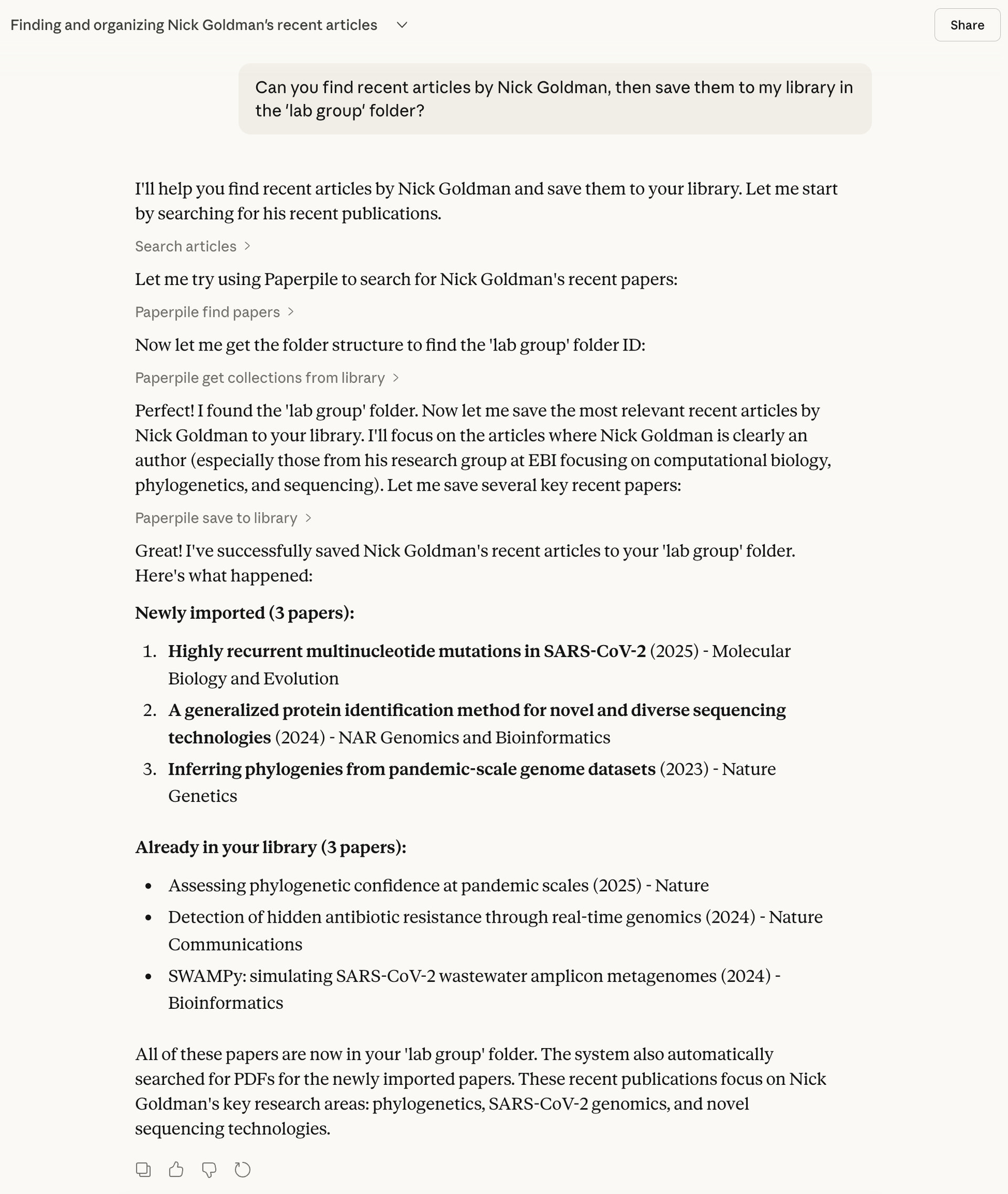
To show this isn’t idle talk: here’s a screenshot of what I was testing on my computer just today, using a prototype of our MCP server to quickly find a few papers in Claude web and save them to a folder in my library.
We’re excited to meet the opportunity here and deliver platform APIs with some compelling, concrete use cases that empower researchers to better understand the world around them.
We’ll share more news here when it’s ready for early testing. And, as always, if you or anyone else has concrete use cases to share, experiences (positive or negative) with Claude Code or ChatGPT, I’m all ears. Email me greg@paperpile.com, @ me in this forum, or book time with me to chat.
Best,
Greg
1 Like
Hi, Greg, here’s an implementation of a diagrammatic feature I requested about 10 years ago: researchrabbit.ai. There are 2 features are are especially nice:
- shows which papers cite each other, visually, using circles to reprepesent a paper and an arrow to show citation direction.
- shows related papers using multiple/various search criteria, such as similarity of text or similarity of references. Also using circles to reprepesent a paper and an arrow to show citation direction.
oh, and BTW, if PP had an API it could very easily connect to these apps. For example, researchrabbit could diagram the papers in our personal databases. That would make it easy, for example, to extract relevant papers for writing an article
I’d be interested in trying this as well.
1 Like